Plugin Architecture
The Principle: Extensible Without Modifying the Hub
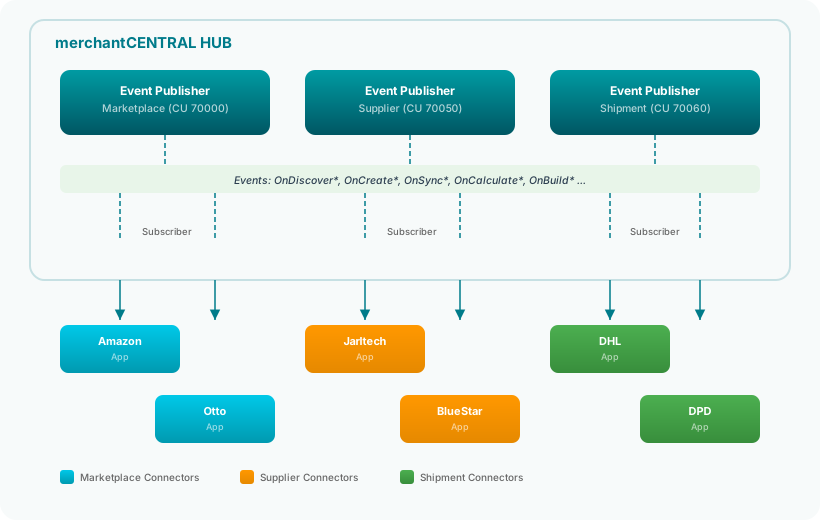
The plugin architecture of merchantCENTRAL is based on the Event Subscriber pattern of Business Central. The hub itself knows nothing about any specific connector app – it doesn't know that Amazon, Otto, or DHL exist. Instead, the hub provides events that connector apps subscribe to.
This means: New channels, suppliers, or shipping providers are added by installing an app – without changing a single line of code in the hub.
Three Event Publishers – Three Connector Types
The hub provides three Event Publisher Codeunits, one for each connector type:
1. Marketplace Event Publisher (CU 70000)
Responsible for marketplace connectors such as Amazon, Otto, Kaufland, eBay, Conrad, Shopify, Shopware, Cdiscount, and SAP Ariba.
Key Events:
| Event Group | Events | Purpose |
|---|---|---|
| Registration | OnDiscoverMarketplaces, OnAfterRegister | Connector registers with the hub |
| Dashboard | OnCollectDashboardData, OnCollectCueData | KPI data for the central dashboard |
| Orders | OnBeforeOrderImport, OnAfterOrderImport | Order import pipeline |
| Shipping Confirmation | OnBeforeShipmentConfirm, OnAfterShipmentConfirm | Report tracking to marketplace |
| Prices & Inventory | OnSyncPrices, OnSyncInventory, OnCalculatePrice | Price/inventory synchronization |
| Item Management | OnBeforeCreateItem, OnAfterCreateItem, OnCollectItemData | Marketplace item lifecycle |
| Navigation | OnBuildNavigationMenu, OnDrillDownItemCard | Connector-specific navigation |
| Tracking | OnTrackingReceived, OnBeforeTrackingSync | Shipment tracking |
| Inventory | OnCalculateAvailableInventory, OnGetChannelAllocatedQty | Inventory calculation |
2. Supplier Event Publisher (CU 70050)
Responsible for supplier connectors such as Jarltech, BlueStar, Wave, VEDES, Systeam, AISCI, GoDEX, Sato, Toshiba, Papyrus, FixPrint, EverIT, and IDENTBASE.
Key Events:
| Event Group | Events | Purpose |
|---|---|---|
| Registration | OnDiscoverSuppliers, OnAfterRegister | Connector registers |
| Import | OnExecuteImport, OnExecuteImportByCode | Trigger data import |
| Data Pipeline | OnBeforeInsertData, OnAfterInsertData | Write data to pool |
| Price Calculation | OnCalculatePurchasePrice, OnCalculateSalesPrice | Price Engine events |
| Item Queries | OnGetBestSupplierOffer, OnGetTotalQuantity | Best offer / total stock |
| Master Data | OnApplySupplierDataToItem, OnResolveItemNo | Item master update |
3. Shipment Event Publisher (CU 70060)
Responsible for shipping provider connectors such as DHL, DPD, GLS, UPS, and Rhenus.
Key Events:
| Event Group | Events | Purpose |
|---|---|---|
| Registration | OnDiscoverProviders, OnAfterRegister | Connector registers |
| Labels | OnCreateLabel, OnAfterCreateLabel, OnGetLabel | Label creation |
| Cancellation | OnCancelShipment, OnAfterCancel | Cancel label/shipment |
| Returns | OnCreateReturnLabel, OnAfterReturnLabel | Return labels |
| Manifest | OnManifestShipments, OnGetManifestDocument | End of day |
| Test | OnTestConnection | Connection test |
| Products | OnGetAvailableProducts | Available carrier products |
The Discovery Pattern
All three connector types follow the identical registration pattern:
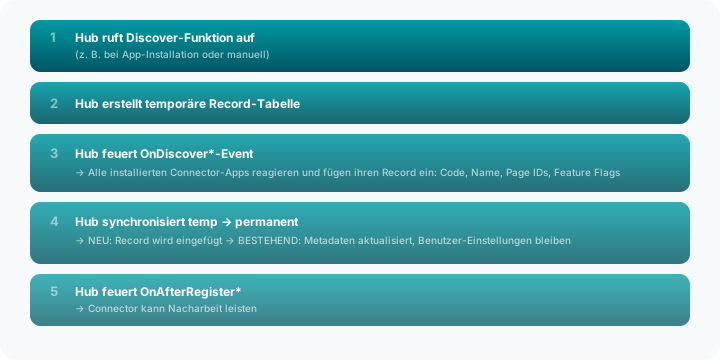
Example: Amazon Connector Registers
[EventSubscriber(ObjectType::Codeunit, Codeunit::"ALN MC Event Publisher",
                  'OnDiscoverMarketplaces', '', false, false)]
local procedure OnDiscoverMarketplaces(var TempMarketplace: Record "ALN MC Marketplace")
begin
    TempMarketplace.Init();
    TempMarketplace.Code := 'AMAZON';
    TempMarketplace.Name := 'Amazon';
    TempMarketplace."Dashboard Page ID" := Page::"Amazon Dashboard";
    TempMarketplace."Order List Page ID" := Page::"Amazon Order List";
    TempMarketplace."Item List Page ID"  := Page::"Amazon Item List";
    TempMarketplace."Connector App ID"   := '...';
    TempMarketplace."Connector App Name" := 'MC Connector Amazon';
    TempMarketplace.Insert();
end;
Guard Clause Pattern
Since all connector apps listen to the same events, each subscriber must first check whether it is responsible:
[EventSubscriber(..., 'OnCreateShipmentLabel', ...)]
local procedure OnCreateShipmentLabel(ProviderCode: Code[20]; ...)
begin
    if ProviderCode <> 'DHL' then
        exit;  // Not for me → exit immediately

    // DHL-specific label creation
    ...
    IsHandled := true;  // Signals the hub: handled
end;
This pattern ensures that: - Only the responsible connector responds - No connector accidentally processes another's data - Performance is not affected (early exit)
Hub Services: Shared Infrastructure
The hub provides all connectors with shared services:
| Service | CU | What It Provides |
|---|---|---|
| Order Import | 70011 | Standardized order import: JSON → BC Sales Order |
| JSON Helper | 70012 | GetText, GetDecimal, GetInteger, GetArray, GetBoolean |
| Rate Limit Handler | 70014 | Exponential Backoff + Circuit Breaker for API rate limits |
| Carrier Mapping | 70015 | Tracking Number → Carrier Code, Tracking URL templates |
| Connector Logger | 70016 | Unified logging: LogSuccess, LogError, LogInfo, LogApiCall |
| Credential Store | 70018 | Secure storage of API keys and OAuth tokens |
| Pagination Helper | 70019 | HATEOAS, Offset/Limit, Cursor, Token-based pagination |
| Doc Attachment | 70020 | Attach PDF/images to BC records |
| HTTP Helper | 70021 | Standardized HTTP calls with logging and timing |
| Item Mgmt. | 70022 | Central marketplace item management |
| OAuth2 Blob Helper | 70023 | Azure Blob Storage download with OAuth2 (Entra ID) |
| Inventory Calc | 70024 | 10-step inventory calculation |
| Email Builder | 70004 | HTML email templates for notifications |
Why Hub Services?
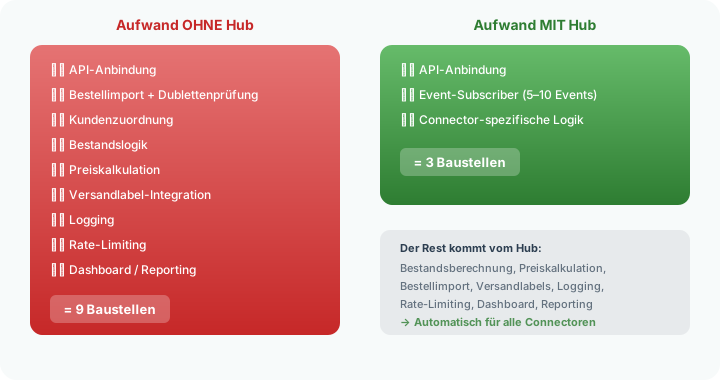
Without hub services, every connector would need its own implementations for: - JSON parsing - HTTP calls - Rate limiting - Logging - Inventory calculation - Order import
That would mean at least 30 duplicated implementations across 9 marketplace, 13 supplier, and 5 shipment connectors. Hub services completely eliminate this redundancy.
Adding a New Connector
To integrate a new marketplace, the new connector app only needs to:
- Subscribe to OnDiscoverMarketplaces and register
- Subscribe to OnSyncInventory / OnSyncPrices for data synchronization
- Subscribe to OnBeforeOrderImport and import orders via the hub
- Subscribe to OnTrackingReceived and send tracking to the API
Everything else – dashboard, inventory calculation, price calculation, label creation, logging – is provided automatically by the hub.
Advantages of the Plugin Architecture
Independent Releases
Each connector has its own release cycle. An update to the Amazon connector does not require an update to the hub or other connectors.
Customer-Side Selection
Customers install only the connectors they need. A company that only sells on Amazon and Otto doesn't need a Kaufland or eBay connector.
Replaceability
A connector can be replaced by an alternative implementation – as long as it serves the same hub events, everything works as usual.
Testability
Each connector can be tested in isolation. The hub provides mock-capable events.
Graceful Degradation
If an optional module (e.g., Price Engine, Print Service) is not installed, the hub still works – with default implementations or without the optional feature.
Related Pages
- The Hub Model – Overview of the hub architecture
- Setup – Hub basic settings
- Marketplace Overview – Registered marketplace connectors
- Supplier Overview – Registered supplier connectors
- Shipping Providers – Registered shipment connectors