Suppliers & Item Pool
The Principle: Many Sources, One Pool
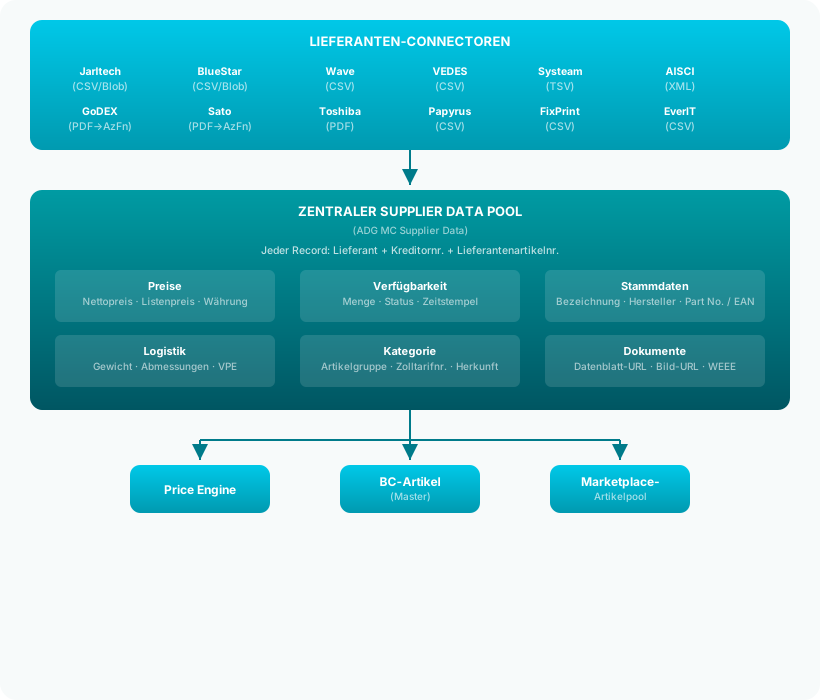
merchantCENTRAL sources item data, prices, and stock levels from 13 or more suppliers – automatically and regularly. Whether a supplier provides a CSV file in Azure Blob Storage, delivers an XML file via an API, or has a PDF price list parsed via Azure Function: All data ends up in the same central pool.
This pool is called ALN MC Supplier Data and is the heart of the supplier integration.
What Is Stored per Supplier Record?
The Supplier Data Pool contains over 40 fields per item-supplier combination:
Identification
| Field | Description | Example |
|---|---|---|
| Supplier Code | Abbreviation of the Supplier Connector | JARLTECH |
| Vendor No. | BC vendor number of the supplier | 20000 |
| Supplier Item No. | Unique item number at the supplier | POS-X EVO-TP6 |
| Manufacturer Item No. | MPN of the manufacturer | 936KH010200733 |
| GTIN / EAN | International article number | 4711234567890 |
Prices
| Field | Description | Example |
|---|---|---|
| Net Price | Purchase price (net, excl. VAT) | €245.00 |
| List Price | MSRP / Recommended retail price | €399.00 |
| Item Type | Stock item, piece price, service | Standard |
| UOM | Unit of measure (pieces per package) | 1 |
Master Data
| Field | Description | Example |
|---|---|---|
| Short Description | Item description (max. 500 characters) | POS-X EVO TP6 Terminal |
| Long Description | Detailed description (max. 2048 characters) | Technical specifications |
| Manufacturer | Manufacturer name | POS-X |
| Item Category | Supplier's product group | POS Terminals |
Logistics
| Field | Description | Example |
|---|---|---|
| Net Weight | Weight without packaging (kg) | 3.50 |
| Gross Weight | Weight with packaging (kg) | 4.20 |
| Length / Width / Height | Dimensions | 35 × 25 × 15 cm |
| Customs Tariff No. | HS code for customs | 84714900 |
| Country of Origin | Source country | CN |
Status
| Field | Description |
|---|---|
| Status | Draft → Active → Inactive (lifecycle) |
| Quantity Available | Current stock level at the supplier |
| Query Timestamp | When the data was last imported |
| Item Update Required | Flag whether the BC item needs updating |
Import Types: Catalog vs. Stock
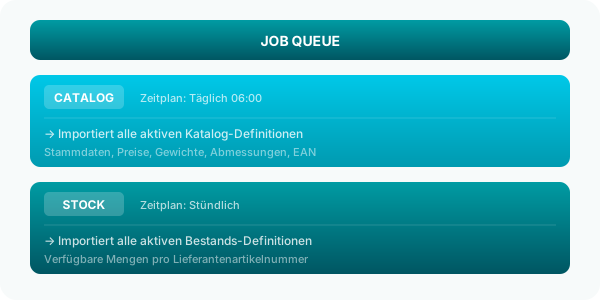
Supplier imports are divided into two categories:
Catalog Items (CATALOG)
- Contains master data and prices
- Typically imported once daily (Job Queue)
- Includes: item description, manufacturer, EAN, net price, MSRP, weight, dimensions
- Sets all existing records to "Draft" before import (status lifecycle)
Stock Levels (STOCK)
- Contains only availability quantities
- Typically imported hourly (Job Queue)
- Includes: supplier item number ↔ available quantity
- Resets all quantities to 0 before import (reset → new stock)
Data Sources and Formats
The supplier connectors support various data sources:
| Source | Description | Suppliers |
|---|---|---|
| Azure Blob Storage | CSV/XML files in Azure, SAS token via Azure Function | Jarltech, BlueStar, Wave, VEDES, Systeam, Papyrus, FixPrint, EverIT, IDENTBASE |
| Azure Function (Parser) | PDF/Excel parsed server-side, JSON returned | GoDEX, Sato, Toshiba |
| XML API | Direct XML file from the supplier | AISCI |
Supported File Formats
| Format | Delimiter | Example Connector |
|---|---|---|
CSV (;) |
Semicolon | Jarltech, BlueStar, VEDES, Papyrus, FixPrint, IDENTBASE |
CSV (,) |
Comma | EverIT |
| TSV (TAB) | Tab | Systeam |
| XML | – | AISCI |
| PDF → JSON | Azure Function parses | GoDEX, Sato, Toshiba |
| Excel → JSON | Azure Function parses | GoDEX (ribbons) |
What Happens After Import?
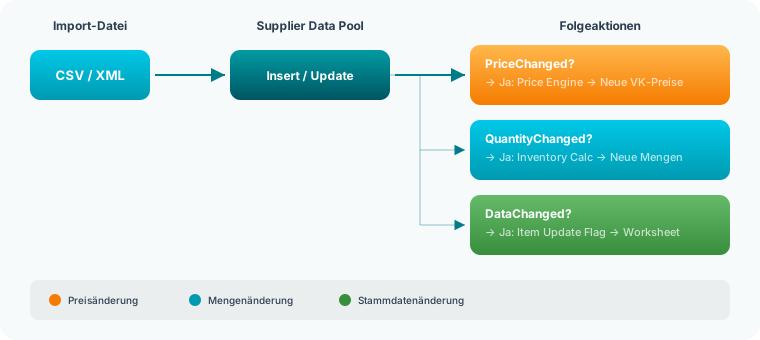
When a supplier connector writes data to the pool, it triggers a cascade:
1. Price Change Detected
If the net price of an item has changed, the PriceChanged flag is set. The Price Engine (if installed) responds and automatically calculates new sales prices for all linked price lists.
2. Quantity Change Detected
If the available quantity has changed, the QuantityChanged flag is set. The inventory calculation updates the marketplace quantities, provided the item has "Include supplier stock" enabled.
3. Update BC Item Master
Via the Item Update Worksheet, changes from the Supplier Data Pool can be transferred to the BC item master – e.g., updated EAN numbers, new weight data, or changed manufacturer details.
Determining the Best Offer
Since multiple suppliers can carry the same item (identified via EAN/GTIN or manufacturer item number), the hub provides a central function: Determine Best Offer.
| Criterion | Description |
|---|---|
| Lowest Price | The supplier with the lowest net price is preferred |
| Availability | Only suppliers with stock > 0 are considered |
| Priority | If prices are equal, the configured primary supplier is preferred |
This function is used by marketplace connectors to determine the optimal purchasing partner for an order.
Supplier Stock in Inventory Calculation
If a marketplace item has the Include Supplier Stock option enabled, the central inventory calculation adds the stock levels of all suppliers carrying this item to the own stock level:
Own Stock:              50 units
+ Supplier Jarltech:    120 units
+ Supplier BlueStar:    30 units
─────────────────────────
Subtotal:               200 units
This allows you to list items that you don't have in your own warehouse but can procure at short notice from a supplier.
Related Pages
- The Hub Model – The central platform concept
- Central Item Pool – How the item pool is structured
- Central Price Management – Automatic price calculation from supplier data
- Supplier List – Manage all supplier connectors
- Supplier Card – Configure a supplier
- Supplier Data – View the Supplier Data Pool
- Supplier Setup – Manage import definitions
- Item Update Worksheet – Transfer supplier data to BC items