The Hub Model of merchantCENTRAL
Why a Hub?
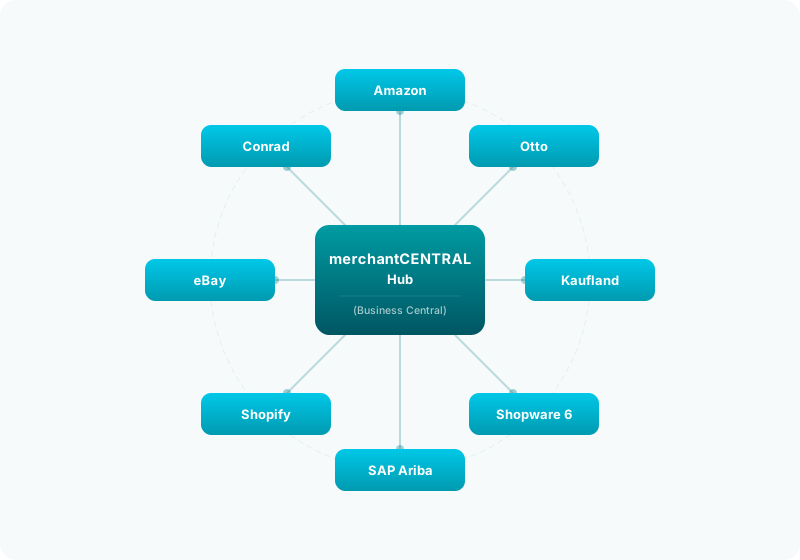
The challenge in multi-channel e-commerce is obvious: Every marketplace – Amazon, Otto, Kaufland, eBay, Conrad, Shopify – has its own APIs, its own data formats, its own order processes, and its own rules. Anyone operating multiple channels quickly faces a tangle of individual solutions that don't communicate with each other.
merchantCENTRAL solves this problem with a hub model: A central platform in Business Central that brings all channels together through a unified interface. Instead of maintaining many isolated point solutions, there is one central node through which everything runs.
The Core Idea: "List Once, Sell Everywhere"
The hub model is based on a simple principle:
| Without Hub | With Hub |
|---|---|
| Each marketplace has its own item master | One central item pool for all channels |
| Orders are processed per marketplace | All orders flow into a unified process |
| Supplier data is maintained manually | Automatic import into a central data pool |
| Prices are manually calculated per channel | Central price calculation with channel-specific adjustments |
| Shipping labels created via separate portals | One shipping system for all carriers |
| Stock levels inconsistent | One inventory calculation for all channels |
Advantages of the Hub Model
1. One Item Base – No Duplicate Effort
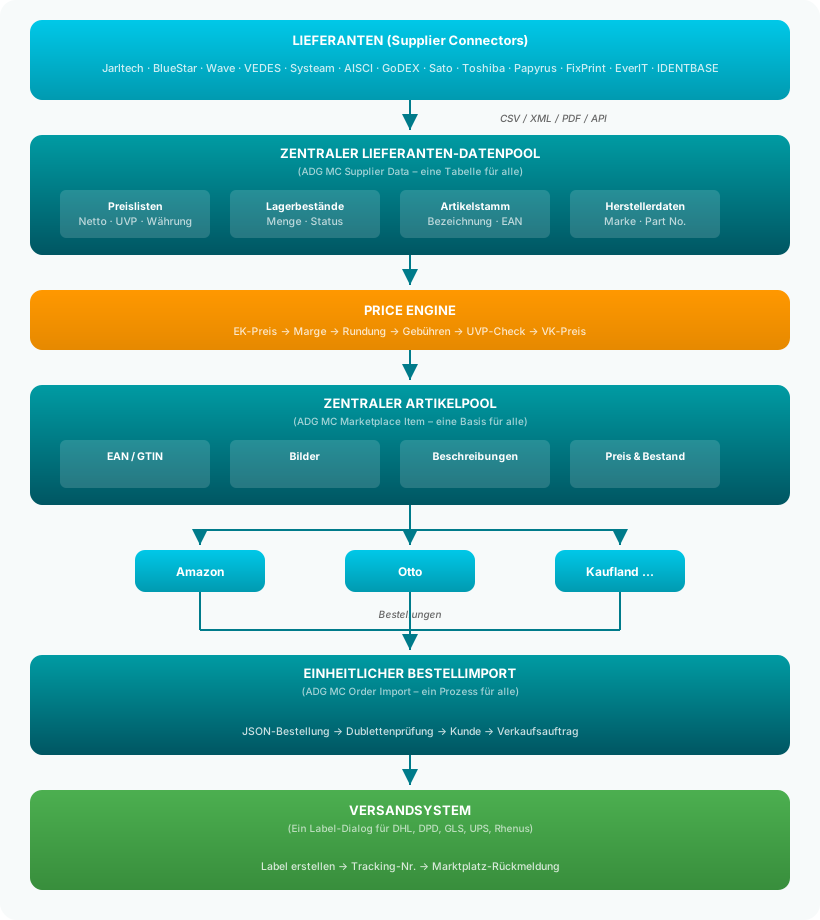
Items are created once in Business Central and made available to all marketplaces via the central item pool (Marketplace Items). Changes to title, description, EAN, images, or category are automatically propagated to all connected channels.
→ More details: Central Item Pool
2. All Suppliers Feed into One Pool
Whether it's Jarltech, BlueStar, Wave, VEDES, or any of the other 13+ supplier connectors – all imported price lists and stock levels end up in one central table: the Supplier Data Pool. From there, they are equally available to all marketplace connectors.
→ More details: Suppliers & Item Pool
3. Central Price Management
Based on supplier prices in the central pool, the Price Engine automatically calculates sales prices – with margins, rounding rules, MSRP caps, and marketplace-specific fees. A price change at the supplier automatically triggers the recalculation of all sales prices.
→ More details: Central Price Management
4. Unified Order Management
Whether an order comes from Amazon, Otto, Kaufland, or your own Shopware shop – it is imported through the same process, converted into the same Business Central sales order, and processed with the same warehouse and shipping workflows.
→ More details: Order Management
5. One Shipping System for All
Labels for DHL, DPD, GLS, UPS, or Rhenus are created from the same dialog. Tracking numbers are automatically assigned to the correct marketplace and reported back as shipping confirmations.
→ More details: Shipping Integration
6. Central Inventory Calculation
A single inventory formula calculates the available quantity for each item and each channel – taking into account safety stock, cross-channel reservations, supplier stock, and maximum quantities.
→ More details: Inventory Calculation
7. One Dashboard for Everything
Instead of opening ten different portals, the merchantCENTRAL Dashboard shows you at a glance:
- How many new orders arrived today
- Which orders are still open
- Which items need updating
- Revenue per channel
8. Scalability Through Plugin Architecture
New marketplaces, suppliers, or shipping providers are installed as standalone apps – without touching the existing configuration. The hub model is designed so that every new channel immediately benefits from the entire infrastructure.
→ More details: Plugin Architecture
The Hub Model at a Glance
Comparison: Hub vs. Individual Solutions
| Criterion | Individual Solutions | merchantCENTRAL Hub |
|---|---|---|
| Item Management | Maintained separately per channel | Created once centrally, available everywhere |
| Price Calculation | Manual per channel | Automatic via Price Engine |
| Order Process | Different per marketplace | One unified workflow |
| Supplier Data | Manual maintenance or custom tools | 13+ automatic importers |
| Shipping Labels | Separate carrier portals | One dialog, all carriers |
| Inventory | Inconsistent individual levels | Cross-channel calculation |
| Adding a New Channel | Completely new integration | Install an app, done |
| Training Effort | Different logic per channel | Learn once, apply everywhere |
| Error Handling | Scattered across different systems | Central activity log |
| Reporting | Tedious across systems | One dashboard, all data |
Who Is the Hub Model For?
The hub model is ideal for businesses that:
- Sell on more than one marketplace (or plan to)
- Want to calculate prices automatically rather than maintaining them manually
- Have multiple suppliers whose data is regularly updated
- Handle shipping via different carriers
- Use Business Central as their leading ERP system
- Want to ensure efficiency and consistency across all channels
Further Documentation
- Central Item Pool – How the shared item master works
- Suppliers & Item Pool – How supplier data flows into the pool
- Central Price Management – Automatic price calculation
- Order Management – The unified order process
- Shipping Integration – One shipping system for all carriers
- Inventory Calculation – The cross-channel inventory formula
- Plugin Architecture – Extensible through connector apps