Cross-Channel Inventory Calculation
The Challenge
Anyone selling on multiple channels simultaneously faces a classic problem: Overselling. If the same stock is listed on Amazon, Otto, and Kaufland in parallel, it can happen that all three channels sell the same last item – and two buyers end up empty-handed.
At the same time, you want to display the available stock as high as possible to maximize sales opportunities.
The Solution: One Central Inventory Formula
The ALN MC Inventory Calc (CU 70024) calculates the optimal available quantity for each item and each channel – in a 10-step process:
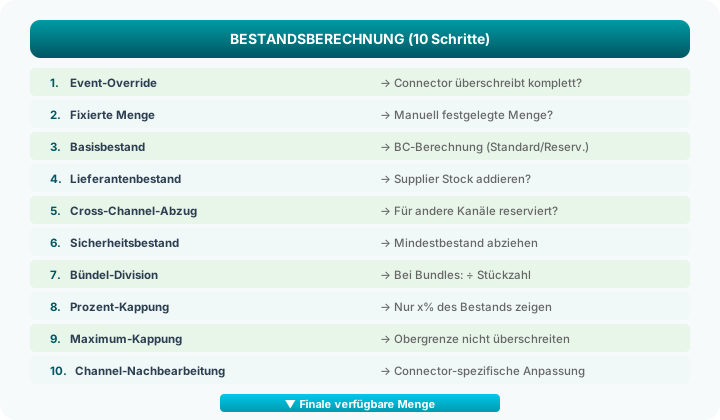
The 10 Steps in Detail
Step 1: Event Override
A connector can override the entire calculation via the event OnCalculateAvailableInventory. This is necessary e.g. for Amazon FBA, where Amazon manages the stock itself.
If overridden: Steps 2–9 are skipped.
Step 2: Fixed Quantity
If the Quantity Fixed flag is set in the Marketplace Item Card, the value entered there is used directly. No automatic calculation.
Use case: Promotional items with deliberately limited quantity or items that should not be automatically stock-managed.
Step 3: Calculate Base Stock
The BC standard calculation determines the available stock at the configured location:
| Calculation Method | Formula |
|---|---|
| Standard | Stock on hand – pending outbound shipments |
| Reserved | Stock on hand – reservations – pending outbound shipments |
| Full | Complete BC availability calculation including incoming receipts |
The method is configured globally in the merchantCENTRAL Setup.
Step 4: Add Supplier Stock
If the Include Supplier Stock option is enabled for the marketplace item, the stock of all suppliers from the Supplier Data Pool is added:
Own Stock:              50 units
+ Supplier Jarltech:    120 units
+ Supplier BlueStar:    30 units
─────────────────────────
Subtotal:               200 units
Important: Only suppliers with status "Active" and quantity > 0 are considered.
Step 5: Cross-Channel Deduction
To avoid overselling, the hub can deduct quantities reserved for other channels. The event OnGetChannelAllocatedQty queries all other marketplace connectors for how much stock they currently consider as "allocated".
Subtotal:               200 units
- Amazon Reservation:   20 units
- Otto Reservation:     10 units
─────────────────────────
After Cross-Channel:    170 units
Step 6: Deduct Safety Stock
The Safety Stock (per marketplace item or globally in the setup) is deducted from the quantity. This ensures you always keep a reserve in the warehouse.
After Cross-Channel:    170 units
- Safety Stock:         5 units
─────────────────────────
After Safety:           165 units
Step 7: Bundle Division
If a marketplace item is a bundle (e.g., 10-pack), the quantity is divided by the Bundle Content:
Individual Item Stock:  165 units
÷ Bundle Content:       10
─────────────────────────
Available Bundles:      16 units
Step 8: Percentage Cap
Via the Quantity Percentage, you can specify that only a portion of the stock is displayed:
After Bundle:           16 units
× Percentage:           80%
─────────────────────────
After Percentage:       12 units (rounded down)
Step 9: Maximum Cap
The Maximum Quantity limits the displayed quantity:
After Percentage:       12 units
Maximum Quantity:       10 units
─────────────────────────
Result:                 10 units (capped)
Use case: You don't want to show that you have 500 units in stock – that could give the impression the item is hard to sell.
Step 10: Channel Post-Processing
Via the event OnAfterCalculateAvailableInventory, each connector can adjust the final quantity – e.g., for FBA stock levels at Amazon or marketplace-specific special rules.
Configuration
Global Settings (merchantCENTRAL Setup)
| Field | Description |
|---|---|
| Inventory Method | Standard / Reserved / Full |
| Include Supplier Stock | Global default for new items |
| Global Safety Stock | Default safety stock for new items |
| Cross-Channel Deduction | Whether other channels are considered |
Per Marketplace Item
| Field | Overrides |
|---|---|
| Quantity Fixed | Entire calculation |
| Safety Stock | Global default value |
| Maximum Quantity | – |
| Quantity Percentage | – |
| Include Supplier Stock | Global default |
| Bundle Content | – |
| Location | Default location |
Complete Example
| Step | Description | Calculation | Result |
|---|---|---|---|
| Base | Stock at location WAREHOUSE | 50 available | 50 |
| + Supplier | Jarltech + BlueStar | 50 + 120 + 30 | 200 |
| - Cross-Channel | Amazon and Otto | 200 - 20 - 10 | 170 |
| - Safety | 5 units minimum stock | 170 - 5 | 165 |
| ÷ Bundle | Individual item (no bundle) | 165 ÷ 1 | 165 |
| × Percentage | 80% of stock | 165 × 0.80 | 132 |
| Max Cap | Maximum = 100 | min(132, 100) | 100 |
Result: Although 200 units are actually available, 100 units are reported as available on this channel.
Why This Matters
Avoid Overselling
Through cross-channel deduction and safety stock, the risk of selling an item that is no longer available is minimized.
Maximize Revenue
By including supplier stock, you can list items that you don't currently have in your own warehouse – and reorder at short notice if needed.
Flexible Per Channel
Each channel can have different inventory parameters – e.g., conservative on Amazon (high safety stock) and more aggressive in your own shop.
Fully Automatic
Inventory calculation runs automatically in the background. When your own stock or supplier stock changes, the marketplace quantity is automatically updated.
Related Pages
- The Hub Model – Overview of the hub architecture
- Central Item Pool – Where calculated quantities are stored
- Suppliers & Item Pool – How supplier stock feeds in
- Item Details – Configure inventory parameters per item
- Setup – Global inventory settings