Central Item Pool
The Concept
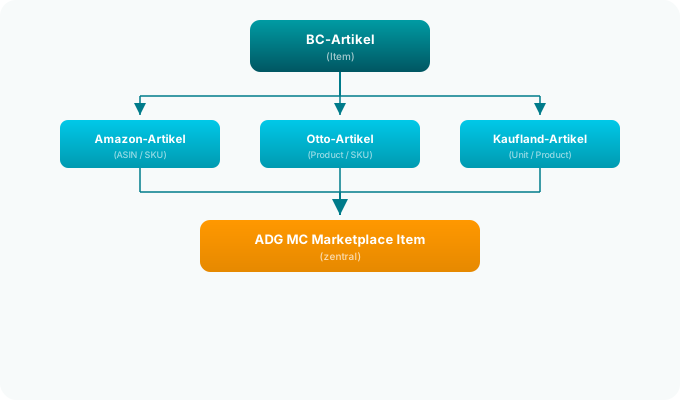
The central item pool is the heart of the hub model. Instead of maintaining separate item masters for each marketplace, there is one single central table – the Marketplace Items – where all product data converges.
Each item is created once in Business Central and can then be assigned to any number of marketplaces. All channels access the same data base.
What Is in the Item Pool?
The central table ALN MC Marketplace Item stores all data that a marketplace requires:
Product Master Data
| Field | Description |
|---|---|
| Item No. | Link to the BC item |
| Marketplace Item ID | The item's ID on the respective marketplace |
| Title | Product title for the marketplace |
| Description | HTML product description |
| EAN / GTIN | Internationally unique article number |
| Brand | Brand name of the product |
| Manufacturer | Manufacturer name |
| Manufacturer Item No. | MPN (Manufacturer Part Number) |
| Category | Marketplace category of the item |
Status & Synchronization
| Field | Description |
|---|---|
| Item Online | Is the item active on the marketplace? |
| Synchronized | Was the latest version successfully transmitted? |
| Sync Status | Current synchronization state |
| Last Synchronization | Timestamp of the last sync |
| Update Required | Flags for item, price, and quantity updates |
Price & Inventory
| Field | Description |
|---|---|
| Marketplace Price | Current sales price on the channel |
| Price Fixed | Flag if the price should not be calculated automatically |
| Currency | Sales currency of the channel |
| Marketplace Quantity | Available quantity on the channel |
| Quantity Fixed | Flag if the quantity should not be calculated automatically |
| Location | BC location for inventory calculation |
Inventory Control
| Field | Description |
|---|---|
| Safety Stock | Minimum stock that will not be sold |
| Maximum Quantity | Upper limit for displayed availability |
| Quantity Percentage | Only a portion of available stock is listed |
| Include Supplier Stock | Whether supplier stock should be added |
| Bundle Content | Pieces per bundle (stock is divided) |
Images
| Field | Description |
|---|---|
| Primary Image URL | Main image of the item |
| Image Count | Number of linked product images |
How Do Items Get into the Pool?
There are three ways items enter the central pool:
1. Manual Assignment
You select a BC item in the Marketplace Item List and assign it to one or more marketplaces. Product data is taken from the BC item master and can be adjusted.
2. Automatic Creation from Supplier Data
When a supplier connector imports new item data and the item already exists in Business Central, it can be automatically assigned to the marketplace items. Master data (EAN, description, manufacturer) flows from the Supplier Data Pool into the Item Pool.
3. Import from Marketplace
Some connectors can import existing listings from the marketplace and create them as marketplace items (e.g., Amazon ASIN search, Kaufland product matching).
What Happens When Data Changes?
When data in the item pool changes – e.g., a new price, an updated description, or a changed quantity – update flags are set:
| Flag | Meaning |
|---|---|
| Item Update Required | Master data (title, description, EAN, images) has changed |
| Price Update Required | The sales price has been recalculated |
| Quantity Update Required | The available stock has changed |
The responsible connector apps detect these flags and synchronize the updated data to the respective marketplace. This happens either automatically via Job Queue or manually through the item update worksheet.
Advantages of the Central Pool
Consistency Across All Channels
Since all marketplaces work from the same data base, product data on Amazon, Otto, Kaufland, and all other channels is always consistent. A change to the EAN or manufacturer name immediately takes effect on all channels.
No Duplicate Maintenance Effort
Instead of adjusting the same product description in five different systems, you change it once in the item pool. The connectors handle the distribution.
Complete Overview
In the Marketplace Item List, you can see at a glance which channels an item is listed on, at what price it is being sold, and how much stock is available.
Marketplace-Specific Adjustments
Despite the central base, you can make individual adjustments for each channel. Each connector can add additional fields via Table Extensions – e.g., Amazon FBA settings, Otto category assignments, or Kaufland price rules.
Interaction with Other Hub Modules

- Supplier Connectors import prices and stock levels into the Supplier Data Pool
- The Price Engine calculates sales prices per price list from that data
- The Item Pool stores the calculated prices and quantities
- The Marketplace Connectors synchronize the data to the respective API
Related Pages
- The Hub Model – Overview of the hub architecture
- Marketplace Item List – Manage all marketplace items
- Item Details – Edit a single marketplace item
- Suppliers & Item Pool – How supplier data flows in
- Central Price Management – Automatic price calculation
- Inventory Calculation – The cross-channel inventory formula